|
| ①주차|도로용품 |
|
|
|
차량통제|주차관제... |
|
|
|
|
|
|
|
|
|
주차장 및 도로안... |
|
|
|
|
|
|
|
|
|
도로시설용품 |
|
|
|
|
|
|
|
|
|
안내간판|표지판 |
|
|
|
|
|
|
|
|
|
점멸반사용품 |
|
|
|
|
|
|
|
|
|
경광등 |
|
|
|
|
|
|
|
|
|
공통자재 |
|
|
|
|
|
|
|
|
|
인력통제 |
|
|
|
|
|
|
|
|
|
도로보수|절단 |
|
|
|
|
|
|
|
|
|
전광판 |
|
|
|
|
|
|
|
|
|
|
| ②안전용품 |
|
|
|
수상안전|항만시설... |
|
|
|
|
|
|
|
|
|
유아|어린이안전용... |
|
|
|
|
|
|
|
|
|
개인보호구 |
|
|
|
|
|
|
|
|
|
장애인편의시설 |
|
|
|
|
|
|
|
|
|
안전망|로프|비나... |
|
|
|
|
|
|
|
|
|
미끄럼방지|논슬립... |
|
|
|
|
|
|
|
|
|
거울|반사경제품 |
|
|
|
|
|
|
|
|
|
가설재 |
|
|
|
|
|
|
|
|
|
측정|계측기기 |
|
|
|
|
|
|
|
|
|
방호장치 |
|
|
|
|
|
|
|
|
|
위생용품 |
|
|
|
|
|
|
|
|
|
상비약|구급함 |
|
|
|
|
|
|
|
|
|
방재용품|패키지상... |
|
|
|
|
|
|
|
|
|
이동식화장실|소변... |
|
|
|
|
|
|
|
|
|
안전장구 통합구매... |
|
|
|
|
|
|
|
|
|
소방용품 |
|
|
|
|
|
|
|
|
|
|
| ③안내간판|반사지|표지판 |
|
|
|
디스플레이|이젤|... |
|
|
|
|
|
|
|
|
|
입간판|표지판 |
|
|
|
|
|
|
|
|
|
게시판|안내판 |
|
|
|
|
|
|
|
|
|
축광제품 |
|
|
|
|
|
|
|
|
|
타포린|안전테이프... |
|
|
|
|
|
|
|
|
|
칠판|화이트보드 |
|
|
|
|
|
|
|
|
|
반사지|안전반사지... |
|
|
|
|
|
|
|
|
|
LED전광판 |
|
|
|
|
|
|
|
|
|
아파트관리용품 |
|
|
|
|
|
|
|
|
|
전자간판|DID|KIO... |
|
|
|
|
|
|
|
|
|
|
| ④생활용품|생활안전|차량용품 |
|
|
|
전열기|히터 |
|
|
|
|
|
|
|
|
|
크리스마스용품 |
|
|
|
|
|
|
|
|
|
여름상품 |
|
|
|
|
|
|
|
|
|
매트|깔판 |
|
|
|
|
|
|
|
|
|
자동차용품 |
|
|
|
|
|
|
|
|
|
생활용품 |
|
|
|
|
|
|
|
|
|
포장관련상품 |
|
|
|
|
|
|
|
|
|
금성 |
|
|
|
|
|
|
|
|
|
정원|원예용품 |
|
|
|
|
|
|
|
|
|
777 |
|
|
|
|
|
|
|
|
|
DIY|보수|시공 |
|
|
|
|
|
|
|
|
|
주방용품 |
|
|
|
|
|
|
|
|
|
겨울용품 |
|
|
|
|
|
|
|
|
|
차량튜닝전기용품... |
|
|
|
|
|
|
|
|
|
도어가드|범퍼가드... |
|
|
|
|
|
|
|
|
|
캠핑/아웃도어 |
|
|
|
|
|
|
|
|
|
선풍기/에어콘 |
|
|
|
|
|
|
|
|
|
어린이용품 |
|
|
|
|
|
|
|
|
|
욕실용품 |
|
|
|
|
|
|
|
|
|
건강|의료 |
|
|
|
|
|
|
|
|
|
|
| ⑤사무용품|가구 |
|
|
|
우산포장|우산봉투... |
|
|
|
|
|
|
|
|
|
POS 및 POS주변기... |
|
|
|
|
|
|
|
|
|
POS터미널 |
|
|
|
|
|
|
|
|
|
POS소모품 |
|
|
|
|
|
|
|
|
|
계측(자/저울) |
|
|
|
|
|
|
|
|
|
책상 |
|
|
|
|
|
|
|
|
|
의자 |
|
|
|
|
|
|
|
|
|
테이블 |
|
|
|
|
|
|
|
|
|
소파 |
|
|
|
|
|
|
|
|
|
철재상품 |
|
|
|
|
|
|
|
|
|
화일박스|금고 |
|
|
|
|
|
|
|
|
|
매장상품 |
|
|
|
|
|
|
|
|
|
보드/칠판 |
|
|
|
|
|
|
|
|
|
사무기능품 |
|
|
|
|
|
|
|
|
|
사무용품 |
|
|
|
|
|
|
|
|
|
금융사무 |
|
|
|
|
|
|
|
|
|
호출시스템 |
|
|
|
|
|
|
|
|
|
발매기 |
|
|
|
|
|
|
|
|
|
방범용품 |
|
|
|
|
|
|
|
|
|
행정사무용품 |
|
|
|
|
|
|
|
|
|
|
| ⑥공구|산업용품 |
|
|
|
전동공구 |
|
|
|
|
|
|
|
|
|
측정공구 |
|
|
|
|
|
|
|
|
|
에어공구 |
|
|
|
|
|
|
|
|
|
용접공구 |
|
|
|
|
|
|
|
|
|
엔진공구 |
|
|
|
|
|
|
|
|
|
수공구 |
|
|
|
|
|
|
|
|
|
산업안전용품 |
|
|
|
|
|
|
|
|
|
전자공구|인두기 |
|
|
|
|
|
|
|
|
|
절삭|초경|다이아... |
|
|
|
|
|
|
|
|
|
유압공구 |
|
|
|
|
|
|
|
|
|
초경공구 |
|
|
|
|
|
|
|
|
|
DIY재료 |
|
|
|
|
|
|
|
|
|
관수용품 |
|
|
|
|
|
|
|
|
|
정원가든용품 |
|
|
|
|
|
|
|
|
|
의료용공구 |
|
|
|
|
|
|
|
|
|
설비공구 |
|
|
|
|
|
|
|
|
|
목공공구 |
|
|
|
|
|
|
|
|
|
공작기계 |
|
|
|
|
|
|
|
|
|
철거|절단공구 |
|
|
|
|
|
|
|
|
|
공구함|보관대|작... |
|
|
|
|
|
|
|
|
|
|
| ⑦철물|건설|건축|토목 |
|
|
|
아크릴제품 |
|
|
|
|
|
|
|
|
|
접착제|실리콘|방... |
|
|
|
|
|
|
|
|
|
각종테이프 |
|
|
|
|
|
|
|
|
|
볼트|너트|앙카류... |
|
|
|
|
|
|
|
|
|
핸들|손잡이|노브... |
|
|
|
|
|
|
|
|
|
방문손잡이 |
|
|
|
|
|
|
|
|
|
가구손잡이 |
|
|
|
|
|
|
|
|
|
정첩 |
|
|
|
|
|
|
|
|
|
특수키|열쇠 |
|
|
|
|
|
|
|
|
|
현관정 |
|
|
|
|
|
|
|
|
|
단조장식 |
|
|
|
|
|
|
|
|
|
주물장식 |
|
|
|
|
|
|
|
|
|
강화도어손잡이 |
|
|
|
|
|
|
|
|
|
옛날장식 |
|
|
|
|
|
|
|
|
|
레일/호차 |
|
|
|
|
|
|
|
|
|
욕실부속 |
|
|
|
|
|
|
|
|
|
몰딩 |
|
|
|
|
|
|
|
|
|
다리/발통 |
|
|
|
|
|
|
|
|
|
후크/와이어부속 |
|
|
|
|
|
|
|
|
|
인테리어장식철물... |
|
|
|
|
|
|
|
|
|
페인트 |
|
|
|
|
|
|
|
|
|
시트지/벽지 |
|
|
|
|
|
|
|
|
|
조명|전기 |
|
|
|
|
|
|
|
|
|
파벽돌/바닥재 |
|
|
|
|
|
|
|
|
|
토목자재 |
|
|
|
|
|
|
|
|
|
스텐제품 |
|
|
|
|
|
|
|
|
|
건축자재 |
|
|
|
|
|
|
|
|
|
|
| ⑧출입|방송|CCTV|방범 |
|
|
|
출입통제 |
|
|
|
|
|
|
|
|
|
CCTV|DVR|렌즈 |
|
|
|
|
|
|
|
|
|
경보기 |
|
|
|
|
|
|
|
|
|
방송설비 |
|
|
|
|
|
|
|
|
|
호신용품 |
|
|
|
|
|
|
|
|
|
탐지기 |
|
|
|
|
|
|
|
|
|
게이트시스템|인력... |
|
|
|
|
|
|
|
|
|
방범보조용품 |
|
|
|
|
|
|
|
|
|
도난방지기(EAS) |
|
|
|
|
|
|
|
|
|
보안용품 |
|
|
|
|
|
|
|
|
|
|
| ⑨영상처리|자동인식 |
|
|
|
문자인식|영상처리... |
|
|
|
|
|
|
|
|
|
산업용컴퓨터 |
|
|
|
|
|
|
|
|
|
바코드처리시스템... |
|
|
|
|
|
|
|
|
|
산업용센서 |
|
|
|
|
|
|
|
|
|
터미널 |
|
|
|
|
|
|
|
|
|
RF시스템(무선인식... |
|
|
|
|
|
|
|
|
|
소모품 |
|
|
|
|
|
|
|
|
|
|
| ⑩전기|자동제어 |
|
|
|
자동제어기 |
|
|
|
|
|
|
|
|
|
콘트롤박스|제어반... |
|
|
|
|
|
|
|
|
|
선풍기|환풍기 |
|
|
|
|
|
|
|
|
|
조명기구 |
|
|
|
|
|
|
|
|
|
배선기구 |
|
|
|
|
|
|
|
|
|
케이블접속|배선자... |
|
|
|
|
|
|
|
|
|
타이머|조광기 |
|
|
|
|
|
|
|
|
|
차단기 |
|
|
|
|
|
|
|
|
|
배전기기 |
|
|
|
|
|
|
|
|
|
LED조명 |
|
|
|
|
|
|
|
|
|
장식조명 |
|
|
|
|
|
|
|
|
|
전선류 |
|
|
|
|
|
|
|
|
|
배터리,건전지 |
|
|
|
|
|
|
|
|
|
계전기기 |
|
|
|
|
|
|
|
|
|
전력기기 |
|
|
|
|
|
|
|
|
|
절연재료 |
|
|
|
|
|
|
|
|
|
방송음향 |
|
|
|
|
|
|
|
|
|
배관자재 |
|
|
|
|
|
|
|
|
|
수배전설비 |
|
|
|
|
|
|
|
|
|
소방|보안|가스기... |
|
|
|
|
|
|
|
|
|
AVR|UPS |
|
|
|
|
|
|
|
|
|
전기공사공구 |
|
|
|
|
|
|
|
|
|
LED응용상품 |
|
|
|
|
|
|
|
|
|
스마트그리드 |
|
|
|
|
|
|
|
|
|
|
| ⑪전자|콘트롤러|지능형홈 |
|
|
|
통신관련장치 |
|
|
|
|
|
|
|
|
|
KIOSK부품 |
|
|
|
|
|
|
|
|
|
개발콘트롤러 |
|
|
|
|
|
|
|
|
|
콘넥터 |
|
|
|
|
|
|
|
|
|
전자부품 |
|
|
|
|
|
|
|
|
|
네트워크 |
|
|
|
|
|
|
|
|
|
로봇 |
|
|
|
|
|
|
|
|
|
기자재|소모품 |
|
|
|
|
|
|
|
|
|
콘덴서 |
|
|
|
|
|
|
|
|
|
반도체부품 |
|
|
|
|
|
|
|
|
|
로직IC |
|
|
|
|
|
|
|
|
|
파워콘트롤 IC |
|
|
|
|
|
|
|
|
|
지능형홈 |
|
|
|
|
|
|
|
|
|
기능성제품 |
|
|
|
|
|
|
|
|
|
|
| ⑫기계|기계요소 |
|
|
|
운반하역기계 |
|
|
|
|
|
|
|
|
|
기계요소|건설|배... |
|
|
|
|
|
|
|
|
|
베어링|캐스트|바... |
|
|
|
|
|
|
|
|
|
샤프트|기어 |
|
|
|
|
|
|
|
|
|
스프링 |
|
|
|
|
|
|
|
|
|
벨트|체인 |
|
|
|
|
|
|
|
|
|
금형부품 |
|
|
|
|
|
|
|
|
|
자동화부품 |
|
|
|
|
|
|
|
|
|
모터|기어|인버터... |
|
|
|
|
|
|
|
|
|
수전|욕실부품 |
|
|
|
|
|
|
|
|
|
손잡이|옛날장식 |
|
|
|
|
|
|
|
|
|
단조제품 |
|
|
|
|
|
|
|
|
|
인테리어철물 |
|
|
|
|
|
|
|
|
|
가구부속 |
|
|
|
|
|
|
|
|
|
건축철물 |
|
|
|
|
|
|
|
|
|
진열장|매대|POP |
|
|
|
|
|
|
|
|
|
|
| ⑬개발상품|기타결재 |
|
|
|
배송비결재 |
|
|
|
|
|
|
|
|
|
제작부품 |
|
|
|
|
|
|
|
|
|
컴퓨터|OA제품수리... |
|
|
|
|
|
|
|
|
|
공공입찰목록관리... |
|
|
|
|
|
|
|
|
|
등록대기상품 |
|
|
|
|
|
|
|
|
|
분류진행상품 |
|
|
|
|
|
|
|
|
|
책임신상품 |
|
|
|
|
|
|
|
|
|
생산자재 |
|
|
|
|
|
|
|
|
|
|
|
|
 |
|
|
 |
|
|
|
 |
|
|
|
|
 |
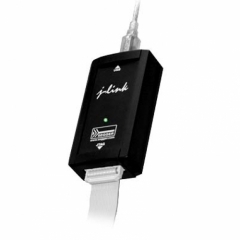
J-Link is a USB powered JTAG emulator for ARM cores. It connects via USB to the Windows (2000/XP) PC host.
Features:
* = Measured with J-Link ARM Rev.5, ARM7 @ 50 MHz, 12MHz JTAG speed.
|
 |
J-Link ARM download speed
The following table lists J-Link ARM performance values (kByte/s) for writing to memory (RAM):
| J-Link Rev. 1-4 |
185.0 kB/s
(4MHz JTAG) |
150.0 kB/s
(4MHz JTAG) |
75.0 kB/s
(4MHz JTAG) |
| J-Link Rev. 5 |
800.0 kB/s
(12MHz JTAG) |
720.0 kB/s
(12MHz JTAG) |
550.0 kB/s
(12MHz JTAG) |
| J-Trace Rev. 1 |
600.0 kB/s
(12MHz JTAG) |
420.0 kB/s
(12MHz JTAG) |
280.0 kB/s
(12MHz JTAG) |
Please note that the actual speed depends on various factors, such as JTAG, clock speed, host CPU core etc.
JTAG Speed
There are basically three types of speed settings:
- Fixed JTAG speed
- Automatic JTAG speed
- Adaptive clocking
Fixed JTAG speed
The target is clocked at a fixed clock speed. The maximum JTAG speed the target can handle depends on the target itself. In general ARM cores without JTAG synchronization logic (such as ARM7-TDMI) can handle JTAG speeds up to the CPU speed, ARM cores with JTAG synchronization logic (such as ARM7-TDMI-S, ARM946E-S, ARM966EJ-S) can handle JTAG speeds up to 1/6 of the CPU speed. JTAG speeds of more than 10 MHz are not recommended.
Automatic JTAG speed
Selects the maximum JTAG speed handled by the TAP controller.
NOTE:
On ARM cores without synchronization logic, this may not work reliably, since the CPU core may be clocked slower than the maximum JTAG speed.
Adaptive clocking
If the target provides the RTCK signal, select the adaptive clocking function to syn- chronize the clock to the processor clock outside the core. This ensures there are no synchronization problems over the JTAG interface.
NOTE:
If you use the adaptive clocking feature, transmission delays, gate delays, and synchronization requirements result in a lower maximum clock frequency than with non-adaptive clocking. Do not use adaptive clocking unless it is required by the hardware design.
Using J-Link
Installing the kernel mode driver
In order to use J-Link, a the kernel mode USB driver jlink.sys needs to be installed. This is done by right clicking on the jlink.inf file and selecting "Install" from the context menu, or by connecting J-Link to a USB port of the Host PC and then referring to the inf file. An installation utility is to come up soon.
Checking functionality
The Jlink.exe file can be used to connect to the ARM chip. It currently permits only simple commands, such as memory dump, halt, step, go, Id-check. This can be used to verify proper installation of the USB driver and to verify the connection to the ARM chip, as well as for simple analysis of the target system.
JTAG interface connection (20 pin)
There is a standard 20 pin connector defined by ARM. J-Link ARM has a built-in 20-pin JTAG connector, which is compatible with this standard.
JTAG interface connector signals :
| 1 |
VTref |
Input |
This is the target reference voltage.
It is used to check if the target has power, to create the logic-level reference for the input comparators and to control the output logic levels to the target. It is normally fed from Vdd of the target board and must not have a series resistor. |
| 2 |
Vsupply |
NC |
This pin is not connected in J-Link.
It is reserved for compatibility with other equipment.
Connect to Vdd or leave open in target system. |
| 3 |
nTRST |
Output |
JTAG Reset. Output from J-Link to the Reset signal on the target JTAG port.
Typically connected to nTRST on the target CPU. This pin is normally pulled HIGH on the target to avoid unintentional resets when there is no connection. |
| 5 |
TDI |
Output |
JTAG data input of target CPU.
It is recommended that this pin is pulled to a defined state on the target board.
Typically connected to TDI on target CPU. |
| 7 |
TMS |
Output |
JTAG mode set input of target CPU.
This pin should be pulled up on the target.
Typically connected to TMS on target CPU. |
| 9 |
TCK |
Output |
JTAG clock signal to target CPU.
It is recommended that this pin is pulled to a defined state on the target board.
Typically connected to TCK on target CPU. |
| 11 |
RTCK |
Input |
Return test clock signal from the target.
Some targets must synchronize the JTAG inputs to internal clocks. To assist in meeting this requirement, you can use a returned, and retimed, TCK to dynamically control the TCK rate. J-Link supports adaptive clocking, which waits for TCK changes to be echoed correctly before making further changes. Connect to RTCK if available, otherwise to GND. |
| 13 |
TDO |
Input |
JTAG data output from target CPU.
Typically connected to TDO on target CPU. |
| 15 |
RESET |
I/O |
Target CPU reset signal. Typically connected to the RESET pin of the target CPU, which is typically called "nRST", "nRESET" or "RESET". |
| 17 |
DBGRQ |
NC |
This pin is not connected in J-Link.
It is reserved for compatibility with other equipment to be used as a debug request signal to the target system.
Typically connected to DBGRQ if available, otherwise left open. |
| 19 |
5V-Supply |
Output |
This pin is used to supply power to some eval boards. Not all J-Links supply power on this pin, only the KS (Kickstart) versions. Typically left open on target hardware. |
Notes
All pins marked NC are not connected inside J-Link. Any signal can be applied here; J-Link will simply ignore such a signal.
All GND pins must be connected to 0V on the target board.
Pin 19 (VCCS) is used to supply J-Link's target interface. J-Link itself is USB powered, only the target interface is powered thru this pin. Should be connected to target CPUs supply voltage (VCC) and should be between 1.8 and 3.3 V.
Pin 2 is not connected inside J-Link. A lot of targets have pin 1 and pin 2 connected. Some targets use pin 2 instead of pin 1 to supply VCC. These targets will not work with J-Link, unless Pin 1 and Pin 2 are connected on the target's JTAG connector.
Pin 3 (TRST) should be connected to target CPUs TRST pin (sometimes called NTRST). J-Link will also work if this pin is not connected, but you may experience some limitations when debugging. TRST should be separate from the CPU Reset (pin 15)
Pin 11 (RTCK) should be connected to RTCK if available, otherwise to GND.
Multiple devices in the scan chain
J-Link ARM can handle multiple devices in the scan chain. This applies to hardware where multiple chips are connected to the same JTAG connector. As can be seen in the drawing below, the TCK and TMS lines of all JTAG device are connected, while the TDI and TDO lines form a bus.

Currently, up to 8 devices in the scan chain are supported. One or more of these devices can be ARM cores; the other devices can be of any other type but need to comply with the JTAG standard.
Multi core debugging
J-Link is able to debug multiple cores on one target system connected to the same scan chain.
How multi-core debugging works
Multi-core debugging requires multiple debuggers or multiple instances of the same debugger. Two or more debuggers can use the same J-Link / J-Trace simultaneously. Configuring a debugger to work with a core in a multi-core environment does not require special settings. All that is required is proper setup of the scan chain for each debugger. This enables J-Link / J-Trace to debug more than one core on a target at the same time.
Both debuggers share the same physical connection. |
 |
J-Link Server

It allows using the J-Link via TCP/IP, which allows connecting to and fully using a J-Link connected to the USB port of an other computer. Performance is just slightly (about 10%) lower than with direct USB connection. The J-Link server is free and included in the software package available for download.
Specifications
| Power Supply |
USB powered <50mA |
| USB Interface |
USB 2.0, full speed |
| Target Interface |
JTAG 20-pin (14-pin adapter available) |
| Serial Transfer Rate between J-Link and Target |
up to 12MHz |
| Supported Target Voltage |
1.2 - 3.3 V (5V adapter available) |
| Operating Temperature |
+ 5 °C ... + 60 °C |
| Storage Temperature |
- 20 °C ... + 65 °C |
| Relative Humidity (non-condensing) |
< 90% rH |
| Size (without cables) |
100 x 53x 27mm |
| Weight (without cables) |
70g |
| Electromagnetic Compatibility (EMC) |
EN 55022, EN 55024 |
| Supported OS |
Microsoft Windows 2000
Microsoft Windows XP
Microsoft Windows XP x64
Microsoft Windows 2003
Microsoft Windows 2003 x64
Microsoft Windows Vista
Microsoft Windows Vista x64 |
Software download
|
|
|
|
|
 |
 |
|
 |
|
 |
 |
입금확인 후 평균 3일 이내로 배송됩니다.
(단, 주문상품, 수입품, 대량주문에 따른 재고부족의 경우 2주 이상의 시간이 요구되는 경우도 있습니다.)
제작 혹은 수입에 1주일 이상 소요되는 제품의 경우 주문시 상품대의 70%이상이 입금되어야 주문이 가능하며, 주문취소가 불가능하므로 주의를 요합니다. 토요일/공휴일은 배송기간에 포함되지 않습니다.
도서/산간지역은 2∼3일 정도 추가 소요됩니다.
불가항력적 (일시품절, 제조사 상품수급 문제, 천재지변 등)인 사유로 배송이 늦어질 수 있습니다.
인쇄가 포함되는 간판류의 배송일은 디자인 시안 확정후 5~7일정도 소요되며, 배송이 지연될 경우 별도의 연락을 드립니다. |
| |
 |
: 전국 (일부지역 제외) | |
| |
 |
|
배송비 포함이 명시되어 있지 않은 모든 상품은 착불로 발송됩니다.
안전용품, 산업용품의 경우 사이즈 및 중량을 확인하고 주문전 배송비를 상담하여 주시기 바랍니다.
상품에 따라 물품구입비용 보다 배송비가 높게 책정되는 경우도 있으며, 배송비 관련 크레임이 간혹 발생합니다.
특히, 배송비 안내시 “파킹세일이 화물 운송비를 부담한다”는 의미는 고객님의 인근 화물 취급소까지만 배송비를 부담한다는 것을 의미하며, 고객님께서 요청하신 화물 취급소에서 제품을 직접 인수하여야 합니다.
만약 고객님께서 원하시는 위치까지 배송을 원하는 경우 배송비(화물연계 택배비)는 고객님께서 직접 부담하셔야 합니다.
판매자가 다른 상품이거나 상품의 카테고리가 다른 경우 혹은 묶음 배송시 손상우려가 있는 상품은 묶음배송이 되지 않습니다.
공장 직접출하 품목은 소형상품인 경우에도 박스당 배송비가 일반적인 경우보다 2배 이상 부가될 수 있습니다.
석재, 고무제품, 중량물 등의 경우에는 화물, 용달, 다마스 배송이 택배나 기타의 배송비 보다 저렴할 수 있습니다.
석재볼라드, 부스 등의 주문시 하차를 위해서는 안전을 위하여 지게차를 준비하셔야 합니다. 지게차 비용은 고객님 부담입니다.
도서, 산간, 오지등 교통이 불편한 지역 배송시 배송비가 추가 될 수 있습니다. | |
| |
|
| |
 |
|
파킹세일에서는 별도로 A/S 기간이 정해진 제품을 제외한 나머지 제품들은 1년간A/S를 보장하며, 출장 A/S는 설치의뢰가 함께 요청된 상품을 제외하고는 실시하지 않습니다.(즉, 제품만 구매한 경우에는 출장 A/S를 실시하지 않습니다.)
특히, 소비재 상품(소모성상품)의 경우에는 구매 확정후에는 A/S가 불가능합니다.
만약 출장 A/S를 원하는 경우 위너기술㈜에서 정한 기준에 따라 소정의 A/S출장비[출장인건비 및 부품비]를 지불하셔야 합니다.
제품 구매 인수 후 7일 이내의 제품은 초기 불량에 한해 1:1 상품 교환 또는 환불이 가능합니다. 단, 제품의 박스 및 구성물이 전부 정상 상태에서만 가능 합니다. 교환의 경우 동일 상품으로 1:1 교환은 가능하나 다른 상품으로 교환은 불가능합니다.
특히, 주문 생산된 상품, 대량으로 물품을 주문한 후 불용자재가 되어 환불요청/물품교환 등이 불가능하므로 특히 주의를 요합니다.
구매한 상품을 환불받으시기 위해서는 제품의 포장상태와 내용물이 훼손되지 않아야 하며 스티커, 테이프를 붙여서 제품의 박스 포장이 훼손되면 환불이 불가합니다.제품 교환, 환불에 대한 내용을 정확히 확인하시고 주문하시기 바랍니다.
청약철회 : 소비자의 단순 변심에 환불은 제품의 포장상태가 처음과 같아 재판매가 가능할 때에 7일 이내에 가능합니다.(운송료 소비자 부담)
그러나 주문제작품, 대량 생산주문 상품은 교환이나 환불이 불가능하므로 주의하여 주십시오.
소프트웨어 상품일 경우, 제품의 개봉 후엔 교환/환불이 절대 불가합니다.
소비자 과실에 의한 파손인 경우에는 유상 A/S 처리가 되며 경우에 따라 A/S가 불가능할 수 있습니다.
천재지변에 의하여 제품에 손상이 있는 경우엔 A/S처리가 불가능할 수 있습니다.
제품 구매 인수 후 7일 이내의 제품 불량 발생시 A/S에 관한 택배 운임비는 전액 파킹세일이 부담합니다.
단, 7일 이후에 발생하는 모든 배송에 관한 운임비는 소비자분께서 부담하시게 되므로 유의하시기 바랍니다.
파킹세일에서 자체적으로 제작한 기능상품의 경우 1년 동안 무상 A/S처리가 됩니다.
단, 파킹세일 상품의 부속품 중 단종이 된 상품은 해당 서비스 업체의 처리 기준에 의해 보상됩니다.
파킹세일에서 판매하는 상품 중 소프트웨어는 A/S항목에 포함되지 않습니다.
파킹세일 쇼핑몰의 주문 유효 기간은 주문 후 7일이며 이후 입금이 되지 않는 주문은 삭제 처리됩니다.
파킹세일에 표기된 모든 가격은 부가세가 포함된 금액이며, 배송비는 대부분 별도입니다.
|
|
| [교환 및 환불의 일반조건: 배송비 파킹세일 부담] |
-. 주문한 내용과 다른 상품을 배송한 경우
-. 상품의 유효기간이 경과한 상품을 배송한 경우
-. 상품의 파손 및 손상된 상품을 배송한 경우 | |
|
| [교환 및 환불이 안되는 조건] |
|
-. 고객님의 요구에 따라 주문 생산된 상품, 인쇄물이 포함된 상품, 철재 혹은 비철 가공품
-. 표준 상품이지만 대량생산 요청하여 생산이 완료된 경우
-. 고객님의 요구에 의하여 해외로부터 수입된 상품
-. 고객님의 책임있는 사유로 상품이 분실 또는 훼손된 경우
-. 포장을 개봉하였거나 포장이 훼손되어 상품가치가 상실된 경우
-. 이용자의 사용 또는 일부소비에 의하여 상품의 가치가 현저히 감소한 경우
-. 시간의 경과에 의하여 재판매가 곤란할 정도로 상품의 가치가 현저히 감소한 경우
-. 상품의 라벨 및 포장의 개봉 후 상품 가치가 훼손된 경우 | |
|
| [환불안내] |
-. 선결제한 주문을 취소한 경우에는 배송출발 전이면 주문 취소 후 조건에 따라 이체 수수료 공제후 환불
-. 반품의 경우에는 파킹세일에서 반품 상품이 도착한 후 조건에 따라 이체 수수료 공제후 환불
-. 신용카드로 결제한 경우 카드사로부터 대금청구가 되었다면 현금으로 입금(조건에 따라 이체 수수료공제 후)
카드사로부터 대금청구가 되지 않았다면, 카드결제 승인취소(카드결제 대금이 청구 되지 않음)
-. 실시간 계좌이체로 결제한 경우 - 승인취소 또는 현금으로 환불
| | |
| |
|
|
|
|
| |
 |
|
전화상담은 월~금 오전 9:00부터 오후 5시까지입니다.
온라인 주문 접수는 24시간 주문 접수는 가능하나 택배 배송 서비스는 오후 4시 30분까지이며, 화물은 오후 3시,퀵 서비스는 오후 5시입니다.
지정된 시간 이후에 주문 확인이나 입금 확인 된 주문은 다음날 발송처리 됩니다. 단, 토요일, 일요일, 공휴일은 휴무입니다. |
 | |
| |
|
| |
 |
| - |
제품 생산공장 운영자, 수입 및 수출업자, 제품의 설치와 시공지원이 가능한 개인 및 법인을 수시로 모집하고 있습니다. |
| - |
우수한 제품을 가지고 판매망이 없어 고민하신다면 관련분야 1위 파킹세일에서 귀사의 상품을 판매하신다면 이미 절반의 성공을이루신 것입니다. |
| - |
파킹세일에 등록된 제품 중 품질이 우수한 제품은 선별적으로 영어, 일본어, 러시아어, 중국어로 번역되어 제품이 소개되어 바이어 유치를 지원하며, 특히, 일본의 경우 전문 유통 협력사를 통하여 일본전역에 직판되는 기회를 함께 누릴 수 있습니다. |
| - |
파킹세일에 새로운 서비스를 제안해 주십시오. 열린생각과 시각으로 고객님과 함께 상생할 수 있는 비즈니스 파트너가 되겠습니다. |
| - |
파킹세일에서 배너광고를 시작하여 보십시오. 안전용품/산업용품관련 최다 회원을 확보하고 있으며, 최고의 Page View를 자랑합니다. |
| - |
파킹세일 회원을 대상으로 이벤트 제휴제안을 받습니다. 경매, 공동구매, 할인쿠폰, 영화예매권 등을 이용한 이벤트 제안 내용이 있으시면 문의하여 주십시오. |
| - |
위탁판매, 제휴, 설치 및 시공 협력사 문의는 info@parkingsale.com입니다. | | | |
|
|
 |
|
 |
|
|
|
|
|



























 현재위치 :